
The Workflow
The Workflow is Contracts 365's monthly newsletter, offering timely insights on contract efficiency, automation, and AI-powered contract management. To help you harness the power of contracts, every day.

New Year, New Site
Contracts 365 Aurora is here!
Contracts 365 Aurora is the biggest upgrade to our platform since launch. This release is not just a new look—it reimagines how people work with contracts by introducing personalized dashboards, a modern user experience, deeper Microsoft 365 integration, and improved functionality that speed everyday tasks.
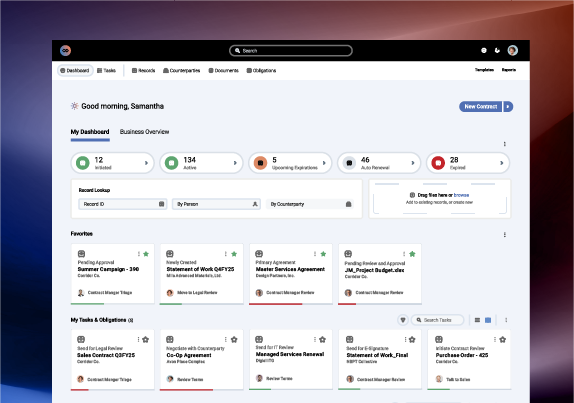 Aurora's New, Reimagined UI
What’s new
- Personalized dashboards
Role-based dashboards with card-style widgets for KPIs, counterparties, favorites, tasks and more. Dashboards are easy to duplicate and customize for specific roles or individuals. - Faster, more intuitive interface
Navigation and workflows are simplified so next-step actions are one click away, reducing time spent hunting for documents or features. - Simplified user and role management
A single Users and Roles model with three license types: Administrator, Contract Professional and Business User. Permissions and states control what people can do, and users sync automatically with Microsoft Entra ID. - Deeper Microsoft 365 integration
Native Entra ID group sync and Microsoft 365 user profile integration let Contracts 365 use directory data such as manager, department and location to reduce manual setup and keep security aligned with your existing Microsoft settings.
Why switch
Aurora was designed to make contract work measurably easier and faster.
- Less admin burden: Entra ID syncing and role-based permissions reduce manual user maintenance and IT involvement.
- Personalized insights: Users see the information that matters to them at a glance, which speeds decision making.
- Stay inside Microsoft 365: Aurora keeps your security and identity model intact by working natively with Entra ID and Microsoft user profiles.
- Built for adoption: Intuitive controls, field guides and knowledge base articles make training faster. The initial Aurora feature set is included at no additional cost for current subscribers.
How the transition works
You can move to Aurora in two main ways.
- Self-enable at no extra cost
Enable Aurora from the dashboard and follow the Implementation Guides and knowledge base articles to configure dashboards, roles and Entra ID integration. - Purchase a Configuration Package
Choose a guided rollout if you want assisted setup, dashboard design, security mapping and hands-on team training. Packages are tiered by hours and scope so you can select the right level of support.
Best of all, Aurora can coexist with the current product to allow staged change management and a smooth rollout.
Real benefits for every user role
- Administrators: One interface to manage users, roles and permissions, with less reliance on SharePoint workarounds.
- Contract teams: AI suggestions and clause playbooks make negotiations faster and more consistent.
- Business users: Custom dashboards and favorites speed approvals, requests and routine tasks.
- Security teams: Entra ID integration and license-aligned roles make access predictable and auditable.
Quick checklist to get started
- Review the Aurora Implementation Overview and Configuration Checklist.
- Decide whether to self-enable or select an Aurora Configuration Package that meets your organization's needs.
- If you're using Entra ID or Microsoft User Profile integration, confirm profile data quality and required tenant permissions.
- If you prefer full service, contact your Customer Success Manager to begin the enablement process.
Start the year on the right footing
Aurora provides the ultimate foundation for smarter contract management: configurable dashboards, a unified identity model, and expanding AI companions. If your team wants faster processes, lower administrative overhead, and a deeper Microsoft 365 alignment, Aurora is the best next step.
Get Started Today