
If your organization runs on Microsoft 365, your contracts already live there too.
They start in Word. They're shared through Outlook. Teams handles redlines and reviews. Documents are stored in SharePoint. Sales tracks opportunities in Dynamics 365 or Salesforce. Finance monitors performance in Power BI. IT governs everything with Microsoft Entra ID.
Then many organizations purchase contract management software, and suddenly contracts live somewhere else.
Instead of building on the Microsoft ecosystem your people already know, many platforms introduce another application, another repository, another security model, and another set of workflows to learn. This typically translates to more complexity for IT, more friction for users, less visibility for leadership, and lower adoption across the board.
But it doesn't have to work that way.
The right contract management software extends Microsoft 365 rather than replacing it. This keeps contracts, workflows, collaboration, security, and governance inside the company's Microsoft environment, while adding the specialized capabilities organizations need to manage the entire contract lifecycle.
Here's what most organizations overlook when they evaluate contract management software and why the architecture of your solution matters more than most organizations realize.
1. Microsoft 365 Is Already Your Contract Workspace
A sales rep requests an agreement from Dynamics 365. Legal drafts it in Word. Stakeholders review language in Teams. Comments come through Outlook. Supporting documents land in SharePoint. Managers approve through Power Automate. Executives track performance in Power BI. Throughout all of it, user access, permissions, and security are managed by Microsoft.
Microsoft 365 isn't just part of the contract lifecycle. For most organizations, it already is the contract workspace.
That's why it's so frustrating when a contract management system asks your team to leave that environment. Every extra application creates another place to work, another system to manage, another process employees have to learn, and another reason not to use it.
The best contract management software fits the way your organization already works. It doesn't ask everyone to change.
2. When Your Contract Management Software Doesn't Fit Your Tech Stack
Most contract management software systems promise efficiency. Many deliver solid functionality. But if the system doesn't integrate naturally into your existing ecosystem, those features often come at the cost of unnecessary complexity.
Traditional solutions were built as standalone SaaS applications. Contracts upload into a vendor-managed repository. Security gets administered separately. Users log into yet another system. Integrations attach Microsoft back on as an afterthought.
A Microsoft-first approach flips this entirely. Rather than asking Microsoft to connect to your contract management software, the software becomes part of the Microsoft experience.
| Traditional Contract Management Software | Microsoft First Contract Management Software |
| Separate cloud repository | Contracts stored in SharePoint |
| Separate security mod | Microsoft Entra ID authentication |
| Duplicate permissions | Your existing Microsoft permissions |
| Standalone document management | Native SharePoint document management |
| Separate workflow | Microsoft Power Platform |
| New interface to learn | Familiar Microsoft applications |
| Additional IT administration | Centralized Microsoft governance |
This isn't just a technical distinction. It's the difference between a solution that gets adopted and one that collects dust.
3. Why True Microsoft 365 Alignment Is Hard
If Microsoft 365 is so widely used, why doesn't every contract management system work naturally within it?
Because Microsoft 365 isn't a single system that a contract management vendor can connect to with one integration. It's an ecosystem of interconnected applications, services, identity controls, data repositories, security policies and business processes. Contracts may be drafted in Word, negotiated through Outlook and Teams, stored in SharePoint, connected to customer data in Dynamics 365, governed through Microsoft Purview, secured through Entra ID, and reported on through Power BI.
Making those pieces work together across the entire contract lifecycle requires more than adding a Microsoft connector.
Microsoft 365 Alignment Has to Reach the Data Layer
True alignment becomes especially difficult because contracts are more than documents. A contract management system also has to manage structured information such as counterparties, contract types, dates, clauses, obligations, approvals, relationships, renewals and business terms.
That information has to stay connected to the contract document while also supporting workflow automation, reporting, search, security and integrations with other enterprise systems.
For organizations that have standardized on Microsoft, the architectural challenge is therefore much bigger than connecting Word or Outlook to a CLM. The contract management system has to work with Microsoft's document, identity, security, workflow and data architecture without creating unnecessary duplication around it.
That's why two systems that both claim to “integrate with Microsoft 365” can create very different experiences for users and IT.
4. The Real Cost of Moving Contracts Outside Microsoft
When organizations evaluate contract management software, the conversation usually centers on features. But one of the most consequential decisions isn't about features at all, it's about architecture.
Where your contracts live affects security, compliance, adoption, and long-term administration in ways that don't show up on a feature checklist.
Security You Shouldn’t Have to Rebuild
Enterprise organizations have already invested heavily in securing Microsoft 365: identity management, conditional access, multi-factor authentication, information protection, data loss prevention, audit logging.
When contracts move into a separate platform, many of these controls have to be duplicated or re-synchronized. IT suddenly has to manages another security boundary alongside the Microsoft environment they've already standardized.
A Microsoft-first approach extends your existing security model. It doesn't create another one to maintain.
Governance Without the Duplication
Contracts contain some of your organization's most sensitive business information—commercial terms, pricing, renewal dates, supplier obligations, intellectual property, compliance requirements.
Keeping contracts outside Microsoft often means building separate governance policies for retention, permissions, legal holds, and records management. Organizations already using Microsoft Purview and SharePoint compliance capabilities can bring contracts under the same governance framework as the rest of their enterprise content, without rebuilding it from scratch.
Adoption That Actually Sticks
The most sophisticated contract management software in the world won't deliver value if employees route around it.
Every time a user has to leave Outlook, Word, Teams, or Dynamics 365 to complete a contract task, adoption gets a little harder. Sales wants to generate contracts from CRM. Legal wants to negotiate in Word. Managers want to approve from Outlook. Executives want contract data in Power BI.
People work faster and smarter in applications they already use every day. That's not a soft benefit. It's the difference between a rollout that delivers ROI and one that stalls.
Less Administrative Overhead
Every additional enterprise application creates more work: another admin console, another user directory, another integration to maintain, another upgrade schedule, another vendor relationship to manage.
None of those tasks is overwhelming on its own. Together, they consume meaningful IT time and budget. Reducing application sprawl is a strategic priority for most enterprise organizations, which makes platform alignment just as important as feature depth.
Isn’t SharePoint Enough?
But SharePoint wasn't designed to manage the contract lifecycle.
A complete solution adds what SharePoint doesn't have on its own: contract request intake, automated approval workflows, clause libraries and templates, AI-powered metadata extraction, obligation tracking, renewal management, executive dashboards, and enterprise-wide reporting.
Think of it this way: SharePoint manages documents. Contract management software manages the business processes surrounding those documents.
The most effective solutions don't replace SharePoint, they build on it.
What Microsoft-First Contract Management Software Looks Like in Practice
Microsoft Word: Legal teams draft, negotiate, compare clauses, and finalize agreements where contract creation already happens, with AI assistance built directly into the drafting experience.
Outlook: Approval requests, notifications, and deadline alerts arrive in employees' inboxes, keeping contracts moving without requiring anyone to log into a separate system.
Microsoft Teams: Cross-functional collaboration stays in Teams, connecting legal, procurement, sales, and finance in one place, without disconnected conversations scattered across email threads.
SharePoint: Executed agreements are stored securely in SharePoint, with existing permissions, version history, retention policies, and enterprise search fully intact.
Dynamics 365: Sales generates contracts directly from CRM records, and contract data flows back automatically, so customer records stay current without manual updates.
Power Platform: Power Automate drives approvals and business processes. Power BI turns contract data into actionable intelligence. Power Apps lets organizations tailor workflows to their specific operational needs.
The goal isn't to replace what Microsoft does well. It's to unlock more value from the investment you've already made.
AI Should Work Where Your Teams Already Work
Some platforms require organizations to upload contracts into a separate AI environment. A Microsoft-first approach embeds AI directly into the tools employees already use every day.
AI can help legal teams compare clauses while drafting in Word. It can automatically extract metadata when contracts are executed, summarize lengthy agreements, surface key obligations, flag renewal risks before they become problems, detect non-standard language, support negotiations, and deliver business intelligence to leadership, all without requiring anyone to leave Microsoft.
When AI is embedded in existing workflows rather than bolted on externally, the result is faster contract reviews, better data quality, and more confident decisions across the organization.
Seven Questions Every Microsoft Organization Should Ask Before Buying
Before selecting a contract management solution, ask:
-
Where are our contracts actually stored?
-
Do documents remain in your Microsoft tenant, or do they move into the vendor's cloud?
-
Does the solution use Microsoft Entra ID? Or will IT need to manage another identity platform?
-
Can users stay in Word, Outlook, Teams, and Dynamics 365? Or will they need to learn a new application?
-
Does it build on SharePoint? Or replace it?
-
How does AI fit into Microsoft workflows? Does it enhance the tools your employees already use?
-
Does contract data sync bidirectionally with CRM? Will legal, sales, procurement, and finance always share the same view?
-
Who owns the data? If you ever switch platforms, do you retain full ownership of your contracts, metadata, and security model?
Getting More from the Microsoft Investment You've Already Made
When your CLM software lives inside the Microsoft ecosystem, adoption comes more naturally. Governance is simpler. Security is already in place. And the people who need to use it: legal, procurement, sales, finance, IT, can do so without changing how they work.
That's what a Microsoft-first approach delivers: not just better contract management, but a smarter use of the technology foundation you've already built.
See Contracts 365 in Action
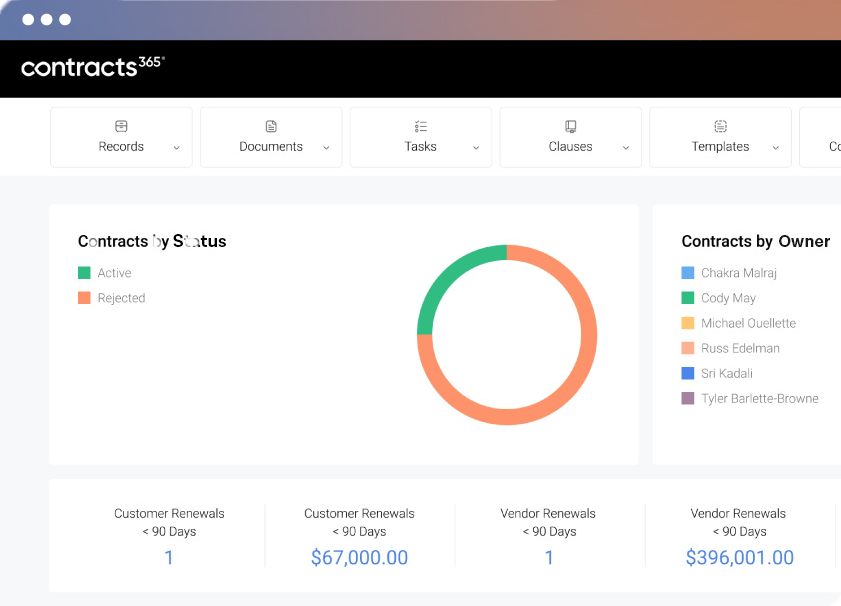
Contracts 365 is purpose-built for Microsoft environments, combining enterprise-grade CLM software with the collaboration, security, governance, and productivity tools organizations already trust. Contracts stay in your tenant. Security stays in your control. And your teams stay in the Microsoft applications they know.
Request a personalized demo and see how Contracts 365 helps you manage the entire contract lifecycle without leaving Microsoft 365.
Frequently Asked Questions
Why doesn’t most contract management software fully integrate with Microsoft 365?
Most contract management software was built as a standalone SaaS or Cloud -based platform with its own document repository, data model, security framework, and workflows. Microsoft integrations are often added later, which can connect tools such as Word, Outlook, Teams, and Dynamics 365 without making Microsoft 365 the underlying foundation of the contract management system.
What is Microsoft-first contract management software?
Microsoft-first contract management software is designed to work within the Microsoft 365 ecosystem rather than operate as a separate platform. Contracts can remain in SharePoint, users can work through familiar Microsoft applications, and organizations can take advantage of existing Microsoft identity, security, governance, workflow, and reporting capabilities.
Is SharePoint enough for contract management?
SharePoint provides strong document storage, permissions, version control, collaboration, search, and governance capabilities, but it was not designed to manage the complete contract lifecycle. Contract management software adds capabilities such as contract requests, approval workflows, templates and clause libraries, AI-powered metadata extraction, obligation tracking, renewal management, and contract reporting.
What should Microsoft 365 organizations look for in contract management software?
Organizations should look beyond whether a contract management system simply “integrates” with Microsoft 365. Consider where contracts and data are stored, whether the system uses Microsoft Entra ID and existing permissions, how deeply it works with SharePoint, Word, Outlook, Teams, Dynamics 365, and the Power Platform, and whether the organization retains control of its contracts, metadata, and security model.