
SharePoint is a powerful platform for document storage, collaboration, and access control—and it is often the default place where contracts live. In fact, many organizations attempt to use SharePoint for simple contract management, storing agreements in SharePoint libraries and folders.
At smaller scale, this approach often works well enough. However, as they ramp up, teams quickly begin to encounter limitations that SharePoint alone was never designed to address.
This article explains why SharePoint-based contract management starts to break down at scale, the risks that emerge as complexity grows, and what organizations typically need to add to regain control.
Why Organizations Start with SharePoint
SharePoint is a natural starting point for contract storage because it:
- Is already part of the Microsoft 365 environment
- Supports permissions and access controls
- Enables document versioning
- Feels familiar to business users
For early-stage or low-volume contract management, these capabilities can be sufficient.
Where SharePoint Begins to Struggle
As contract volume grows, the requirements for managing contracts change. What once worked becomes increasingly fragile. Here are five areas where SharePoint does not support contract management at scale.
1. Contracts Become Hard to Find
Contracts are often stored across multiple sites, libraries, and folders. Naming conventions vary, metadata is inconsistently applied, and search results become unreliable. Teams spend time hunting for contracts instead of acting on them.
2. Metadata Is Inconsistent or Incomplete
SharePoint supports metadata fields but enforcing consistent metadata capture across contracts is difficult. Common issues include:
- Required fields left blank
- Different teams tracking different data
- Metadata not updated when contracts change
Without reliable metadata, reporting and alerts are unreliable.
3. Post-Signature Obligations Remain Hidden
SharePoint stores documents, not obligations. Renewal terms, notice periods, service levels, and other obligations remain embedded in contract language unless manually extracted and tracked. This makes it easy to miss deadlines and commitments.
4. Version Control Becomes Confusing
Over time, contracts accumulate amendments, addenda, and restatements. Even with version history, it becomes difficult to determine:
- Which version is authoritative
- Which terms are currently in effect
- How changes impact obligations and renewals
This increases legal and operational risk.
5. Ownership and Accountability Are Unclear
SharePoint does not define who owns a contract after signature. Legal may negotiate the agreement, but responsibility for renewals, obligations, and performance often sits elsewhere. Without structured workflows, accountability is informal and inconsistent.
The Operational Risk of Relying on SharePoint Alone
These limitations do not usually cause immediate failure. Instead, they create cumulative risk. Organizations relying solely on SharePoint often experience:
- Missed renewals and notice deadlines
- Unintended auto-renewals
- Missed contractual obligations
- Reactive legal and procurement work
The larger the contract portfolio, the greater the exposure.
Why This Is a Scale Problem, Not a SharePoint Problem
It is important to note that SharePoint is not failing. It is simply being asked to do more than it was designed to do. SharePoint excels at document management. Contract management, however, requires lifecycle awareness, structured data, and ongoing governance. As scale increases, those requirements become non-negotiable.
The Contract Management Features Organizations Add as They Mature
Organizations that outgrow SharePoint alone typically add tools and capabilities that introduce structure and visibility. These include:
- Standardized contract metadata
- Centralized contract records
- Renewal and notice tracking
- Obligation management
- Audit-ready reporting
The goal is not to replace SharePoint, but to extend it.
AI Extraction Companion
The Contracts 365 AI Extraction Companion is an incredibly powerful tool that automatically identifies and extracts key data from contracts—all seamlessly integrated into the Contract 365 platform. Download the eBook now
A Contract Lifecycle Perspective
Contract lifecycle management focuses on what happens before and after signature. At scale, this means:
- Capturing contract data at execution
- Managing changes over time
- Monitoring obligations and renewals
- Maintaining a clear system of record
Without lifecycle continuity, contracts remain static documents rather than governed assets.
A Microsoft 365–Aligned Approach
For Microsoft-first organizations, the most effective approach is one that builds on existing Microsoft 365 investments. By layering structured contract lifecycle management capabilities on top of SharePoint, organizations can:
- Preserve familiar tools and security models
- Improve metadata consistency (Read our ebook: The importance of Metadata in Contract Management)
- Surface obligations and renewal risks
- Enable reporting and audit readiness
This approach avoids rip-and-replace projects while restoring control.
Signs Your Organization Has Outgrown SharePoint Alone
Organizations often reach an inflection point when:
- Contracts are difficult to locate
- Renewals are tracked manually
- Obligations are missed or enforced inconsistently
- Reporting requires significant manual effort
These signals indicate that document storage alone is no longer sufficient.
SharePoint vs Contract Lifecycle Management Software
SharePoint is designed for document management, while contract lifecycle management (CLM) software is designed to manage contracts across their full lifecycle.
Key differences include:
| Capability | SharePoint | CLM Software |
|---|---|---|
| Document storage | Yes | Yes |
| Contract metadata | Limited | Structured |
| Renewal tracking | Manual | Automated |
| Obligation management | No | Yes |
| Lifecycle visibility | Limited | Full lifecycle |
For organizations managing hundreds or thousands of contracts, contract management systems extend SharePoint with lifecycle visibility, automation, and governance.
For Microsoft-first organizations, extending SharePoint with contract lifecycle management capabilities enables scale without disruption—while reducing risk and improving operational confidence.
Contracts 365: Microsoft-First Contract Management Software
When evaluating contract management software, organizations should consider several factors:
- AI capabilities and metadata extraction accuracy
- Integration with enterprise systems such as Microsoft 365 and CRM platforms such as Dynamics 365
- Workflow automation and approval management
- Obligation tracking and compliance monitoring
- Reporting and analytics capabilities
- Ease of adoption for business users
As contract volume and regulatory requirements grow, organizations increasingly prioritize platforms that integrate directly into their existing technology ecosystems.
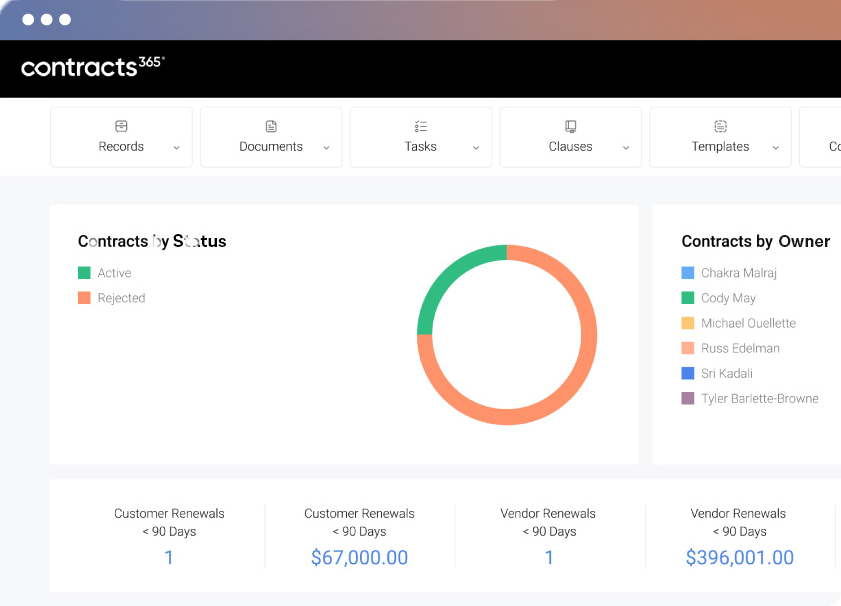
If you’d like to learn more about our Contract Management Software for businesses that run Microsoft 365, please don’t hesitate to reach out to us or, even better, request a demo and we can show you how it works in real-time.
Frequently Asked Questions About SharePoint Contract Management
1. Can SharePoint be used for contract management?
Yes, SharePoint can be used to store and organize contract documents. Many organizations start with SharePoint because it is already part of Microsoft 365 and supports permissions, version history, and collaboration. However, SharePoint is primarily designed for document management rather than full contract lifecycle management. As contract volume grows, organizations often encounter challenges with metadata consistency, obligation tracking, renewals, and reporting.
2. What are the limitations of SharePoint for contract management?
The most common limitations include inconsistent metadata capture, difficulty tracking renewals and obligations, limited lifecycle visibility, and manual reporting processes. While SharePoint is effective for document storage, it does not provide built-in capabilities for managing contract data, deadlines, or post-signature obligations at scale.
3. What is the difference between SharePoint and contract lifecycle management (CLM) software?
SharePoint is designed to manage documents, while contract lifecycle management (CLM) software manages the entire lifecycle of a contract—from request and drafting through negotiation, execution, and post-signature management. CLM platforms provide structured metadata, renewal tracking, obligation management, workflow automation, and reporting capabilities that extend beyond document storage.
4. When should an organization move beyond SharePoint for contract management?
Organizations typically outgrow SharePoint alone when contract volume increases and teams begin relying on manual processes to track renewals, obligations, and reporting. Signs include difficulty locating contracts, missed notice periods, inconsistent metadata, and time-consuming reporting. At this stage, organizations often extend SharePoint with contract lifecycle management software to gain lifecycle visibility and automation.
5. How do organizations manage contracts within Microsoft 365?
Many organizations manage contracts within Microsoft 365 by combining SharePoint with contract lifecycle management software that integrates directly with Microsoft tools such as Outlook, Word, Teams, and Dynamics 365. This approach allows organizations to retain SharePoint for document storage while adding structured metadata, workflow automation, and lifecycle management capabilities.