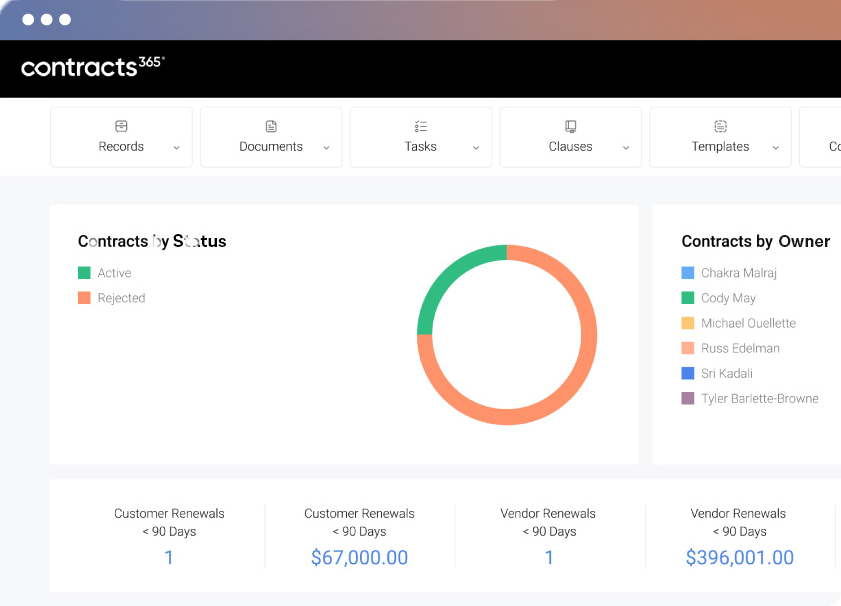
For organizations that rely on Microsoft 365, contracts are already part of the Microsoft environment. Agreements are drafted and negotiated in Word, exchanged through Outlook, discussed in Teams, stored in SharePoint, and often connected to customer, vendor, financial, and operational data maintained in other Microsoft applications.
Yet many organizations manage the contract lifecycle in a separate system. That can create an unnecessary divide between where contracts are managed and where people actually work.
Contract management software designed for Microsoft 365 takes a more connected approach. It adds the structure required to manage contracts throughout their lifecycle while building on the Microsoft technology, security, data, and applications already in place.
For organizations evaluating contract management software, the depth of that Microsoft alignment deserves careful consideration. The architecture of a contract management system can affect adoption, security, data quality, integration, reporting, and the organization's ability to use contract information across the business.
At a Glance
Contract management software for Microsoft 365 combines purpose-built contract lifecycle management capabilities with the Microsoft applications organizations already use. SharePoint can provide the foundation for contract documents and data, while Word, Outlook, Teams, Dynamics 365, and Power Platform support different aspects of contract creation, collaboration, workflow, and reporting.
The degree of Microsoft alignment varies considerably among contract management platforms. Some connect to Microsoft applications through integrations. Others use Microsoft 365 more extensively as part of the underlying contract management environment. Understanding that difference can help organizations choose a contract management system that fits their existing technology strategy.
What Is Contract Management Software for Microsoft 365?
Contract management software for Microsoft 365 is a contract management system designed to work with Microsoft technologies to manage agreements from initial request and drafting through negotiation, approval, signature, obligation management, renewal, and reporting.
Microsoft 365 already provides many of the building blocks organizations need for contract work. SharePoint can store and organize documents. Word supports drafting and redlining. Outlook and Teams facilitate communication and collaboration. Power Automate supports workflows, while Power BI provides reporting and analysis.
For relatively straightforward contract processes, organizations can assemble these capabilities themselves. As contract volume and complexity increase, however, the effort required to configure and maintain those processes can grow considerably. Contract-specific requirements such as clause management, negotiation controls, structured metadata, approvals, obligations, renewal management, and portfolio reporting may require custom development or additional applications.
Purpose-built contract management software provides that contract-specific layer while allowing Microsoft 365 to remain the enterprise foundation.
Why Microsoft 365 Alignment Matters for Contract Management
Contracts move through many parts of an organization. Legal may draft and negotiate agreements, procurement manages supplier relationships, sales works with customer contracts, finance needs visibility into commercial commitments, and business teams are often responsible for fulfilling obligations after agreements are signed.
Those activities also generate valuable business data. Renewal dates, pricing terms, obligations, termination rights, risk provisions, and other contract information can influence decisions well beyond the legal department.
When a contract management system is disconnected from the applications and data employees use every day, organizations may find themselves maintaining parallel processes. Documents are moved between systems, information is entered more than once, and users have to switch applications to complete routine contract work. These additional steps can affect adoption and make it harder to maintain accurate, trusted contract data.
Contract management software aligned with Microsoft 365 can reduce some of that friction by connecting contract processes with the existing technology environment. Word remains part of drafting and negotiation. SharePoint can provide the contract repository. Outlook and Teams support communication and collaboration. Dynamics 365 can connect contracts with business records, while Power Platform can extend contract data into workflows, applications, and reporting.
The result is greater continuity between the contract management process and the systems employees already use to conduct business.
Microsoft 365 Alone vs. Purpose-Built Contract Management Software
Microsoft 365 provides mature capabilities for document management, collaboration, workflow, security, and reporting. For some organizations, these tools are sufficient to support basic contract processes.
The limitations tend to become more apparent as contract requirements become more specialized. Organizations may need standardized intake, contract templates, clause controls, approval routing, negotiation workflows, obligation tracking, renewal management, contract-specific reporting, and AI-assisted review. Building these capabilities internally can require significant configuration and ongoing support.
A purpose-built contract management system brings these capabilities together within a structured contract lifecycle.
| Capability | Microsoft 365 Alone | Purpose-Built Contract Management Software for Microsoft 365 |
|---|---|---|
| Contract storage | SharePoint libraries | Structured contract repository using or connected to SharePoint |
| Drafting and collaboration | Microsoft Word | Contract templates, clauses, version control, and negotiation workflows |
| Contract requests | Forms and custom configuration | Purpose-built contract intake |
| Approvals | Power Automate or custom workflows | Contract-specific routing and approvals |
| Contract metadata | SharePoint fields or custom data structures | Structured metadata tied to the contract lifecycle |
| Clause management | Manual or custom | Centralized clause libraries and approved alternatives |
| Obligations | Manual tracking or custom development | Structured obligation tracking, ownership, and alerts |
| Renewals | Calendars, lists, or custom alerts | Automated dates, notifications, and renewal workflows |
| AI | General Microsoft AI capabilities | Contract-specific extraction, review, negotiation, and analysis |
| Reporting | Power BI or custom reporting | Contract-specific reporting that can connect with broader BI tools |
| CRM connectivity | Dynamics 365 available separately | Contract and CRM data connected through contract workflows |
The appropriate approach depends on contract volume, process complexity, governance requirements, internal IT resources, and how extensively contract information needs to connect with other business systems.
The Role of SharePoint in Contract Management
SharePoint is well suited to many of the foundational requirements of contract management. It provides document storage, version history, permissions, metadata, search, and information governance within an environment many organizations already manage.
This makes SharePoint a logical foundation for a contract repository, particularly for companies that want contract documents and data to remain within their Microsoft environment.
A repository, however, represents only one part of a contract management system. Organizations also need to manage how agreements are requested, created, reviewed, negotiated, approved, signed, monitored, renewed, and reported on. As these requirements grow, organizations relying on SharePoint alone can find themselves building increasingly sophisticated custom workflows and applications.
Purpose-built contract management software can provide this contract-specific process layer while allowing SharePoint to continue serving as the document and data foundation. Organizations considering this approach should understand SharePoint's role as a platform for contract management and its limitations.
How Contract Management Software Fits Across Microsoft 365
The advantages of a Microsoft-aligned contract management system become more apparent when contract management is considered across the broader technology environment.
SharePoint can provide the foundation for the contract repository, including documents, metadata, permissions, search, and governance.
Microsoft Word remains central to contract drafting and negotiation. Connecting contract management software with Word allows legal and business teams to work in a familiar application while applying greater structure around templates, clauses, versions, approvals, and negotiation.
Outlook and Teams support much of the communication that takes place around contracts. Connecting these applications with the contract management system can make participation easier while keeping the underlying agreement and contract data within a governed process.
Dynamics 365 can connect commercial and contract processes. Customer, opportunity, or transaction information can help initiate contract workflows, while relevant contract information can be made available to teams managing the underlying business relationship. Organizations considering how these systems should work together can explore the role of Microsoft Dynamics 365 in contract management.
Power Platform provides another layer of flexibility. Power Automate, Power BI, Power Apps, and related technologies can connect contract information with broader workflows, analytics, applications, and enterprise data.
Together, these capabilities create an environment in which contracts can be managed as business assets and the information within them can remain useful throughout the organization.
What Does "Microsoft-Native" Contract Management Actually Mean?
Microsoft integration has become a common requirement when organizations evaluate contract management software, but the term can describe very different technical approaches.
A contract management platform may integrate with Word and Outlook while maintaining its own external repository for contract documents and data. Another may use SharePoint and the customer's Microsoft 365 tenant as fundamental elements of its architecture.
Both approaches can provide useful Microsoft functionality. The differences become more significant when organizations consider security, governance, data ownership, integration, IT administration, and long-term architecture.
Buyers should therefore look beyond the number of Microsoft integrations a vendor offers and understand how the contract management system actually uses Microsoft technology:
- Where are contract documents stored?
- Where does contract metadata reside?
- Does the contract management platform operate within the organization's Microsoft 365 tenant?
- How are Microsoft identities, permissions, and security controls applied?
- Can users work with contracts from familiar Microsoft applications?
- How does contract information connect with Dynamics 365 and other business systems?
- Can the organization use contract data through Power Platform and enterprise reporting tools?
- What happens to contract documents and data if the organization changes contract management software providers?
Contracts 365 takes a Microsoft-native approach to contract management. Contract documents and data remain within the customer's Microsoft 365 environment, while Contracts 365 extends that environment with the workflows, controls, contract intelligence, and lifecycle management capabilities needed to manage agreements at scale.
Security, Governance, and Contract Data
Contracts often contain some of an organization's most sensitive business information, including pricing, intellectual property, customer and supplier terms, personal information, and strategic commitments. Where that information resides and how access is governed should therefore be part of any contract management software evaluation.
For organizations already operating within Microsoft 365, keeping contract information within the Microsoft environment can allow existing identity, permissions, security, and governance practices to extend to contracts. It can also reduce the need to maintain another external repository containing sensitive contract information.
Architecture also affects the value of contract data. Dates, obligations, commercial terms, risk provisions, and other metadata become more useful when they can be governed, reported on, and connected with other enterprise information.
This is one reason organizations should consider contract data alongside contract documents when choosing a contract management system. The agreement itself is important, but so is the structured information contained within it. Trusted contract data allows legal, procurement, finance, sales, and business teams to make better-informed decisions throughout the life of the agreement.
Organizations evaluating these issues should also consider data privacy and security best practices for contract management in Microsoft 365.
AI and Contract Management Software in Microsoft 365
AI is changing how organizations interact with contracts, but its value depends heavily on context. Extracting a date or identifying a clause can save time. Greater value emerges when those capabilities operate within established workflows, approved standards, reliable contract data, and appropriate human review.
Within a contract management system, AI can help extract information such as parties, dates, renewal terms, payment provisions, and other metadata. It can support contract review by comparing language against organizational standards and identifying provisions that require attention. During negotiation, AI can help evaluate proposed language against approved clauses or playbooks and assist users as they review and redline agreements.
AI can also make the contract portfolio more useful after signature. Once contract information is structured and accessible, organizations can analyze obligations, renewals, commercial terms, risk provisions, and other information across agreements.
For Microsoft 365 organizations, the practical consideration is how these capabilities fit within the existing contract process and data environment. AI is most useful when it operates on trusted information within governed business processes. A contract management platform provides the context that connects AI capabilities with the policies, workflows, data, and human judgment required to use them effectively.
For a broader look at this topic, see our guide to AI contract management in Microsoft 365. Organizations focused specifically on negotiation can also explore how AI can support contract negotiation, while practical applications of AI in contract management provides examples across the contract lifecycle.
Benefits of Contract Management Software Built for Microsoft 365
Organizations that already rely on Microsoft technology can gain several practical advantages from extending that environment into contract management.
One is continuity. Employees can continue working with familiar applications while contract processes become more structured. SharePoint can remain the foundation for documents and data, Word can remain central to drafting and negotiation, and other Microsoft applications can participate in the process where appropriate.
A second advantage is data connectivity. Contract information can be connected with customer, vendor, financial, and operational data, making contracts more useful beyond the legal or procurement function.
There are also governance considerations. Building on existing Microsoft identity, permissions, security, and data practices can give IT teams a more consistent environment to manage.
A Microsoft-based contract management platform can also make contract data more accessible to the broader enterprise technology strategy. Power Platform, reporting tools, and other Microsoft capabilities can extend the value of contract information into workflows and decisions across the business.
How to Evaluate Contract Management Software for Microsoft 365
Microsoft integration should be evaluated as an architectural question as well as a feature question. A contract management platform may check the boxes for Word, Outlook, or SharePoint integration while taking a very different approach to documents, data, security, and workflow.
Organizations evaluating contract management software should understand where their information will reside, how users will interact with the system, and how contract data will connect with the rest of the business.
Useful questions include:
- Where will our contract documents and metadata be stored?
- How does the contract management system use SharePoint?
- How does it work with Microsoft Word during drafting and negotiation?
- How are Outlook and Teams incorporated into contract processes?
- What information can move between the contract management system and Dynamics 365?
- Can we use our existing Microsoft identity, permissions, and security model?
- Can contract information connect with Power Platform and our broader reporting environment?
- What contract-specific AI capabilities are available, and how are they governed?
- How much custom development is required to support our processes?
- What happens to our documents and contract data if we change contract management software providers?
These questions can help organizations distinguish between contract management software that connects to Microsoft applications and a contract management system designed around the Microsoft environment.
Microsoft 365 Contract Management in Practice
The practical value of a Microsoft-based contract management strategy depends on how well the technology fits an organization's existing processes, data, security requirements, and technology environment.
Port Blakely, a multigenerational forest products company, selected Contracts 365 as part of an effort to modernize contract management while building on its Microsoft investment. Its experience provides one example of how organizations can add purpose-built contract management capabilities without separating contracts from the broader Microsoft environment.
Microsoft 365 Contract Management in Practice: Port Blakely Case Study
Learn More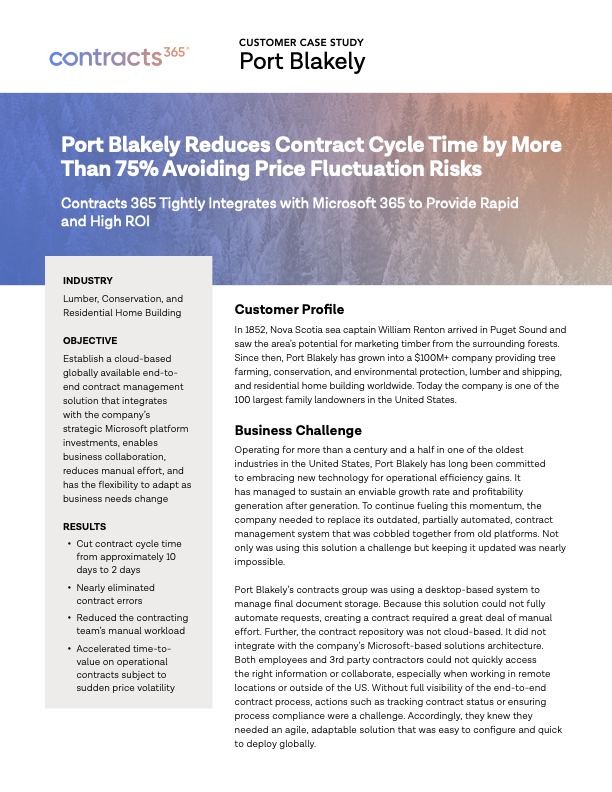
Is Microsoft 365 Contract Management the Right Approach for Your Organization?
For organizations with relatively straightforward contract requirements, Microsoft 365 tools may be sufficient to support basic document storage, collaboration, approvals, and reporting.
The case for purpose-built contract management software becomes stronger as contract volume, complexity, and business importance increase. Negotiation standards, approval rules, obligations, renewal management, structured contract data, reporting, AI, and cross-functional workflows introduce requirements that can be difficult to manage through a collection of custom tools and processes.
Organizations that have already made a significant investment in Microsoft 365 have another consideration: whether adding a contract management system requires creating a separate technology and data environment.
A Microsoft-native contract management platform allows the organization to retain Microsoft 365 as its enterprise foundation while extending it with contract-specific capabilities. For legal, procurement, IT, and business leaders, this can provide a more coherent way to manage contracts while making the information within them more accessible and useful across the organization.
Frequently Asked Questions
What is contract management software for Microsoft 365?
Contract management software for Microsoft 365 is a system designed to manage contracts throughout their lifecycle while working with Microsoft technologies. Depending on the architecture, it may use SharePoint for contract documents and data, Word for drafting and negotiation, Outlook and Teams for collaboration, Dynamics 365 for business information, and Power Platform for workflow, integration, and reporting.
Can Microsoft 365 be used as a contract management system?
Microsoft 365 provides tools that can support contract storage, collaboration, workflow, and reporting, and these may be sufficient for relatively straightforward contract requirements. As contract volume and complexity increase, purpose-built contract management software can provide more structure around requests, approvals, clauses, negotiations, metadata, obligations, renewals, reporting, and AI.
Can SharePoint be used for contract management?
SharePoint can provide a strong foundation for contract storage, permissions, metadata, search, versioning, and governance. Organizations with more complex requirements may add purpose-built contract management software to manage the processes surrounding the repository, including intake, drafting, negotiation, approvals, obligations, renewals, and reporting.
What is Microsoft-native contract management software?
Microsoft-native contract management software generally refers to software that uses Microsoft technologies as a fundamental part of its architecture. Because vendors use the term differently, buyers should examine where contract documents and data reside, how Microsoft security and identity are used, and how deeply the contract management platform works with the broader Microsoft environment.
Does contract management software integrate with Dynamics 365?
Yes, many contract management systems can integrate with Dynamics 365, although the depth of integration varies. Integration can allow customer, opportunity, vendor, or transaction information to initiate contract processes and allow relevant contract information to flow back to the appropriate business record.
How is AI used in contract management software?
AI can support contract data extraction, review, negotiation, summarization, risk identification, and portfolio analysis. Its usefulness increases when it operates on trusted contract information within organizational standards, established workflows, and appropriate human oversight.
What is the difference between contract management software and CLM software?
The terms are often used interchangeably. Contract management software is the broader and more commonly understood term, while CLM software generally refers to technology designed to manage the full contract lifecycle, from request and drafting through negotiation, approval, signature, obligations, renewals, and reporting.
Where should contract documents and data be stored?
There is no single architecture that is appropriate for every organization. Companies should evaluate storage based on security, governance, integration, data ownership, and technology requirements. Organizations heavily invested in Microsoft 365 may prefer contract management software that keeps contract documents and data within the Microsoft environment so existing governance and security practices can extend to contract information.
What should I look for in contract management software for Microsoft 365?
Look beyond basic application integrations. Evaluate where documents and metadata are stored, how the contract management system uses SharePoint, how users work with Word, Outlook, and Teams, how the platform connects with Dynamics 365 and Power Platform, how identity and security are handled, and what contract-specific workflow, reporting, and AI capabilities are provided.
Extend Microsoft 365 with Purpose-Built Contract Management Software
Contracts 365 provides contract management software purpose-built for Microsoft 365. The Contracts 365 contract management platform adds contract-specific workflows, data management, automation, reporting, and AI while allowing Microsoft 365 to remain the foundation for documents, data, security, and collaboration.
For organizations evaluating a contract management system that fits within an existing Microsoft environment, a Contracts 365 demo provides an opportunity to see the architecture and workflows in practice.
See how Contracts 365 extends Microsoft 365 with purpose-built contract management software. Request a demo to see it Contracts 365 in action today.